
Showing posts with label Tutorial. Show all posts
Showing posts with label Tutorial. Show all posts

visit link: http://www.siteliner.com
Free Check Duplicate content, double content, Content Ordinary, Unique Content and Broken Links.
I will review how to find out duplicate content, regular content or content that is already common, and unique content on the blog or website by using Siteliner.com. before you read the first definition of duplicate content, regular content, and unique content.
Duplicate content is a similarity of title, description or content of your article that happen because you Copy paste. :)
But not all duplicate content because Copy paste. Duplicate content generally also occur because of some inadvertence blogger on his blog.
Regular content or content that is generally a lot of content already published. meaning many are serving the same article of the decree anything but served in a different way.
Unique content is the original content of thought and knowledge that is rarely the talk or they rarely write about the article.
did not seem to know enough understanding only, we also need to know how to check what percentage of duplicate content, regular content, and unique content to your blog. Listen to the way of knowing duplicate content, regular content, and unique content below.
How to Check Duplicate content, Content Ordinary and Unique Content
diagram
My blog she is less good because still quite a lot of articles or content that is common or common content. You can see for yourself 23% was not bad lot.
so that's how know duplicate content, regular content, and unique content on the blog.
I will review how to find out duplicate content, regular content or content that is already common, and unique content on the blog or website by using Siteliner.com. before you read the first definition of duplicate content, regular content, and unique content.
How to Check Duplicate content, Content Ordinary and Unique Content
siteliner
Duplicate content is a similarity of title, description or content of your article that happen because you Copas. :)
But not all duplicate content because Copy paste. Duplicate content generally also occur because of some inadvertence blogger on his blog.
Regular content or content that is generally a lot of content already published. meaning many are serving the same article of the decree anything but served in a different way.
Unique content is the original content of thought and knowledge that is rarely the talk or they rarely write about the article.
did not seem to know enough understanding only, we also need to know how to check what percentage of duplicate content, regular content, and unique content to your blog. Listen to the way of knowing duplicate content, regular content, and unique content follows
How to Check Duplicate content, multiple content on blogspot and website
You have an image which you would like to use as a background for your template? If so, then follow these steps.
1. Download one of the templates below depending on your preference.
Download the dark template for dark colored images and the light one for light colored images.
Unzip the downloaded file.
2. Upload your image to a free image hosting site like http://imageshack.us/
Select the' Do Not Resize' option before uploading

3. Copy the Direct Link provided after the upload

4. Open the downloaded template file in any text editor like Notepad
Search for INSERT LINK HERE and replace it with the image link

5. Save the file. Your template is now ready, see the Using the Template tutorial on how to apply the template to your blog.
1. Download one of the templates below depending on your preference.
Download the dark template for dark colored images and the light one for light colored images.
Unzip the downloaded file.
2. Upload your image to a free image hosting site like http://imageshack.us/
Select the' Do Not Resize' option before uploading

3. Copy the Direct Link provided after the upload

4. Open the downloaded template file in any text editor like Notepad
Search for INSERT LINK HERE and replace it with the image link

5. Save the file. Your template is now ready, see the Using the Template tutorial on how to apply the template to your blog.
Making Your Own Template
For further assistance email bloggerdesigns [at] gmail [dot] com
1. Click on the Get Template link to download the ZIP file containing the template.
2. Unzip the file, there will be 2 files inside, the Readme.txt and one more txt file with the template code.
3. Login to your blogger account and go to Template -> Backup / Restore
4. Click on Download Full Template to save your existing template
5. Click on Choose File and select the file with the template code.
6. Click Upload


8. Your template is now ready.
9. Go to Customize to customize the colors and fonts of your new template.
10. If you receive the following error message 'Your template could not be parsed as it is not well-formed. Please make sure all XML elements are closed properly.
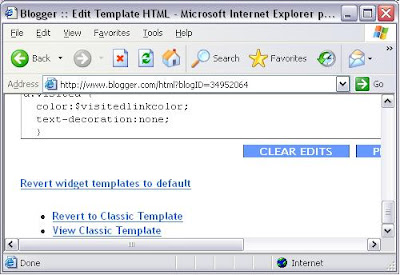
XML error message: The markup in the document preceding the root element must be well-formed.' scroll down the page and click on Revert to Classic Template.
1. Click on the Get Template link to download the ZIP file containing the template.
2. Unzip the file, there will be 2 files inside, the Readme.txt and one more txt file with the template code.
3. Login to your blogger account and go to Template -> Backup / Restore
4. Click on Download Full Template to save your existing template
5. Click on Choose File and select the file with the template code.
6. Click Upload


8. Your template is now ready.
9. Go to Customize to customize the colors and fonts of your new template.
10. If you receive the following error message 'Your template could not be parsed as it is not well-formed. Please make sure all XML elements are closed properly.
XML error message: The markup in the document preceding the root element must be well-formed.' scroll down the page and click on Revert to Classic Template.
Using the Template
Subscribe to:
Posts
(
Atom
)


