
Showing posts with label Portfolio. Show all posts
Showing posts with label Portfolio. Show all posts

Platform: Blogger / Blogspot
Release date : Oct 2013
Free download blogspot template Html5 CSS3
Template features : Magazine, Showcase, Featured Content Slider, Fixed Width, Dropdown Menu, Social Widget, Page Navigation.
License : Creative Commons Attribution 3.0
Basic Instructions : How to install a Blogger Template
Configure Timestamp Format:
Log in to Blogger Dashboard --> Settings --> Language and formatting
If you don't do this, it will display "UNDEFINED".
Configure Featured Content Slider:
Login to blogger dashboard --> layout --> Edit HTML. Now scroll down to where you see the codes below:<ul class='slides'> <li><article class='wk-content clearfix'>
<div class='slide_demo' style='background: url(../image1.jpg) 100% 0 no-repeat;'><a href='#'><h2>Artists of the City</h2></a>
<p>Meet passionate designers at ...</p><p><em>Friday - Sunday from 10am - 8pm</em></p></div></article></li> ..........
- "#" with your featured post URL.
- "image1.jpg" with your slider image.
Configure Dropdown Menu:
Login to blogger dashboard --> layout --> Edit HTML. Now scroll down to where you see the codes below:<ul class='menu menu-dropdown'> <li><a class='level1' href='#'><span>Home</span></a></li> <li class='level1 parent'><a class='level1' href='#'><span>Features</span></a> <ul class='level2'> <li class='level2'><a class='level2' href='#'><span>Module Variations</span></a></li> ..........
Configure Social Widget:
search for:<ul class='social-mini'> <li class='rss'><a expr:href='data:blog.homepageUrl + "feeds/posts/default"'/></li> <li class='twitter'><a href='#'/></li> <li class='facebook'><a href='#'/></li> <li class='dribbble'><a href='#'/></li> <li class='forrst'><a href='#'/></li> <li class='flickr'><a href='#'/></li> <li class='yahoo'><a href='#'/></li> </ul>
Configure Page Navigation Widget
search for:var posts=5, // Number of posts in each page num=3, // Number of buttons will display
Downtown Blogger Template - Html5 CSS3 Template
Platform: Blogger / Blogspot
Release date : Aug 2013
Free download blogspot template Html5 CSS3
Designer : QuanticaLabs
Template features : Blogging, Portfolio, Corporate, Clean Design, Featured Content Slider, Fixed Width, Dropdown Menu, Social Widget, Page Navigation.
License : Creative Commons Attribution 3.0
Basic Instructions : How to install a Blogger Template
Configure Featured Content Slider:
Login to blogger dashboard --> layout --> Edit HTML. Now scroll down to where you see the codes below:<div id='slider'> <a href='#'><img src='../slider_img1.jpg'/></a> <img src='../slider_img2.jpg' title='#sliderText1'/> <img src='../slider_img3.jpg' title='#sliderText2'/> </div> </div> <div class='nivo-html-caption' id='sliderText1'> <div class='sliderCaption sliderCaptionVisual'> <h2 class='topNone'>Visual identity</h2> If you want promote your business... <a href='#'> more »</a> </div> </div> ..........
- "#" with your featured post URL.
- "slider_img1.jpg" with your slider image.
Configure Dropdown Menu:
Login to blogger dashboard --> layout --> Edit HTML. Now scroll down to where you see the codes below:<ul class='sf-menu'> <li class='current'><a expr:href='data:blog.homepageUrl'>Home</a></li> <li><a href='#'>Blog</a> <ul> <li><a href='#'>Blog Main</a></li> <li><a href='#'>Single Post</a></li> ..........
Configure Social Widget:
search for:<ul class='footerSocial itemList'> <li class='footerSocialRSS'><a class='imageLink' expr:href='data:blog.homepageUrl + "feeds/posts/default"'/></li> <li class='footerSocialFacebook'><a class='imageLink' href='#'/></li> <li class='footerSocialTwitter'><a class='imageLink' href='#'/></li> </ul>
Configure Page Navigation Widget
search for:var posts=4, // Number of posts in each page num=2, // Number of buttons will display
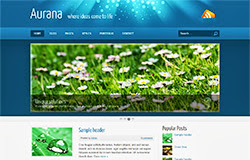
Aurana Blogger Template Html5 CSS3 Template

Platform: Blogger / Blogspot
Release date : May 2013
Free download blogspot template Html5 CSS3
Designer : themeblvd
Template features : Portfolio, Fashion, Featured Content Slider, Fixed Width, Dropdown Menu, Social Widget, Blue Background, Page Navigation Widget.
License : Creative Commons Attribution 3.0
Basic Instructions : How to install a Blogger Template
Configure Featured Content Slider:
Login to blogger dashboard --> layout --> Edit HTML. Now scroll down to where you see the codes below:<ul class='carrousel-slider'> <li class='slide'> <div class='slide-body'> <div class='grid-protection'> <a class='image-link enlarge' href='#'><span>Image Link</span></a> <img src='../slide.jpg'/> </div> </div> </li> ..........
- "#" with your featured post URL.
- "slide.jpg" with your slider image.
Configure Dropdown Menu:
Login to blogger dashboard --> layout --> Edit HTML. Now scroll down to where you see the codes below:<ul class='menu' id='menu-main-menu'> <li><a href='#'>Home</a></li> <li><a href='#'>Blog</a></li> <ul class='sub-menu'> <li><a href='#'>Full Width Page</a></li> <li><a href='#'>Sidebar Right</a></li> ..........
Configure Page Navigation Widget:
search for:var posts=8, // Number of posts in each page num=2, // Number of buttons will display
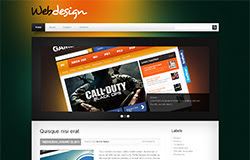
Alyeska Blogger Template Html5 CSS3
Platform: Blogger / Blogspot
Release date : January 2013
Free download blogspot template Html5 CSS3
Template features : 2 Columns, Right Sidebar, Website Design, Featured Content Slider, Fixed Width, Dark Green Background, Page Navigation Widget.
License : Creative Commons Attribution 3.0
Basic Instructions : How to install a Blogger Template
Configure Featured Content Slider:
Login to blogger dashboard --> layout --> Edit HTML. Now scroll down to where you see the codes below:<div class='nivoSlider' id='slider'> <img src='../slider-1.jpg' .......... <div class='nivo-html-caption' id='sliderCaption1'> <div class='title'><a href='#'>Consectetur</a></div> Lorem ipsum dolor sit amet...</div> ..........
- "#" with your featured post URL.
- "slide-1.jpg" with your slider image.
Configure Page Navigation Widget:
search for:var posts=3, // Number of posts in each page num=2, // Number of buttons will display
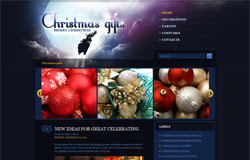
WebDesign Blogger Template Html5 CSS3
Platform: Blogger / Blogspot
Free download blogspot template Html5 CSS3
Template features : 2 Columns, Right Sidebar, Christmas, Portfolio, Featured Video Slider, Fixed Width, Dark Background.
License : Creative Commons Attribution 3.0
Basic Instructions : How to install a Blogger Template
Configure Featured Video Slider:
Login to blogger dashboard --> layout --> Edit HTML. Now scroll down to where you see the codes below:<li> <div class='boxgrid captionfull'> <a href='#'><img height='269' src='../slider1.jpg' width='296'/></a> <div class='cover boxcaption' style=' top:269px; cursor: pointer;'> <h3 class='entry-title'>christmas decoration #1</h3> <div class='entry-content'><p>$57</p></div> <a class='more' href='#'>read more</a></div> </div> </li> ..........
- "#" with your featured post URL.
- "slide,jpg" with your slider image URL.
Christmas Gifts Blogger Template

Platform: Blogger / Blogspot
Free download blogspot template Html5 CSS3
Designer : temashdesignlab
Template features : Wordpress Look, 2 Columns, 3 Columns Footer, Left Sidebar, Portfolio, Business, Featured Content Slider, Fixed Width, Light Gray Background, Top Navigation Menu, Page Navigation Widget.
License : Creative Commons Attribution 3.0
Instructions : eSpecial Blogger Template
eSpecial

Template features : Wordpress Look, 2 Columns, 3 Columns Footer, Left Sidebar, Portfolio, Business, Featured Content Slider, Fixed Width, Dark Background, Top Navigation Menu, Page Navigation Widget.
Free download blogspot template Html5 CSS3
Designer : temashdesignlab
License : Creative Commons Attribution 3.0
Basic Instructions : How to install a Blogger Template
Configure Post Date:
Log in to Blogger Dashboard --> Settings --> Format. Make sure the Timestamp Format and Language are all changed to the following: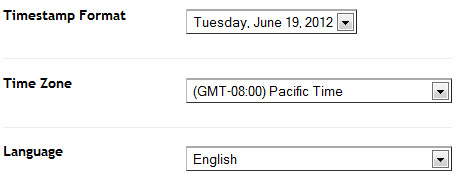
If you don't do this, it will display "UNDEFINED".
Configure Featured Content Slider:
Login to blogger dashboard --> layout --> Edit HTML. Now scroll down to where you see the codes below:<ul class='lof1-main-wapper'> <li><a href='#'><img src='/image.jpg'/></a> <div class='lof1-main-item-desc'> <div class='lof1-main-item-title'> <h2><a href='#'>Professional Business & Portfolio Theme</a></h2></div> <p>Lorem ipsum dolor sit amet, consectetur adipiscing elit.</p> </div> </li> .......... <ul class='lof1-navigator'> <li><img src='/thumb.jpg'/> </li> ..........
- "#" with your featured post URL.
- "image.jpg" with your slider image.
- "thumb.jpg" with your thumbnail image.
Configure Dropdown Menu:
Login to blogger dashboard --> layout --> Edit HTML. Now scroll down to where you see the codes below:<ul class='s-menu' id='menu-main-navigation'> <li><a href='#'>Home</a> <ul class='sub-menu'> <li><a href='#'>Home page layout 2</a></li> </ul> </li> <li><a href='#'>Sliders</a> ..........
Configure Page Navigation Widget:
search for:var posts=4, // Number of posts in each page num=2, // Number of buttons will display
eSpecial Blogger Template
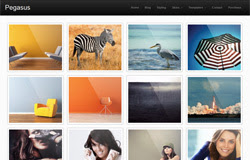
Template features : Wordpress Look, Portfolio Homepage, 2 Columns, Right Sidebar, 4 Columns Footer, White Background, Social Widget, Page Navigation Widget, Dropdown Menu.
Free download blogspot template Html5 CSS3
Designer : wpexplorer
Basic Instructions : How to install a Blogger Template
Updated (12-08-2012): fix a critical bug that make all js effects stop working
Configure Dropdown Menu:
Login to blogger dashboard --> layout --> Edit HTML. Now scroll down to where you see the codes below:<div class='menu-main-container'> <ul class='sf-menu' id='menu-main'> <li><a href='#'>Home</a></li> <li><a href='#'>Blog</a></li> <ul class='sub-menu'> <li><a href='#'>Black</a></li> <li><a href='#'>Blue</a></li> ..........
Configure Page Navigation Widget:
search for:var posts=12, // Number of posts in each page num=2, // Number of buttons will display
Pegasus Blogger Template

Template features : Wordpress Look, 2 Columns, Right Sidebar, Photography, Elegant, Featured Content Slider, Fixed Width, Black Background, Top Navigation Menu, Page Navigation.
Free download blogspot template Html5 CSS3
Designer : Freshface
Basic Instructions : How to install a Blogger Template
Configure Post Date:
Log in to Blogger Dashboard --> Settings --> Format and change this:If you don't do this, it will display "UNDEFINED".
Configure Featured Content Slider:
Login to blogger dashboard --> layout --> Edit HTML. Now scroll down to where you see the codes below:<ul id='fresh_cube_data'> <li class='fresh_cube_image_0'> <img src='/image.jpg'/> <span class='transition' title='random'> <div class='post_category' id='slider_post_cat'>/ <a href='#'>Web Design</a>/</div> <div class='post_name'> <a href='#' id='slider_img_desc'>1000s of Images In My Mind</a> </div> </span> </li> .......... <div class='thumbs' id='thumbs'> <div class='slider_content' id='sl_content'> <ul id='slider_ul'> <li><img alt='img' src='/thumb.jpg'/> <div class='slider_tit' style='display:none'>/ Web Design /</div> <a class='slider_desc' href='#' style='display:none' title='0'>1000s of Images In My Mind</a> </li> ..........
- "#" with your featured post URL.
- "image.jpg" with your slider image.
- "thumb.jpg" with your thumbnail image.
Configure Dropdown Menu:
Login to blogger dashboard --> layout --> Edit HTML. Now scroll down to where you see the codes below:<div class='menu-nav-container'> <ul class='menu' id='menu-nav'> <li><a expr:href='data:blog.homepageUrl'>Home</a></li> <li><a href='#'>About</a> <ul class='sub-menu'> <li><a href='#'>Dropdown test</a></li> ..........
Configure Page Navigation Widget:
search for:var posts=2, // Number of posts in each page num=2, // Number of buttons will display
London Creative Blogger Template

Template features : Wordpress Look, 2 Columns, 4 Columns Footer, Right Sidebar, Portfolio, Header Banner, Featured Content Slider, Fixed Width, Blue Background, Top Navigation Menu, Page Navigation, Social Bar.
Free download blogspot template Html5 CSS3
Designer : ghostpool
Basic Instructions : How to install a Blogger Template
Configure Featured Content Slider:
Login to blogger dashboard --> layout --> Edit HTML. Now scroll down to where you see the codes below:<div class='slide' style='width: 950px; height: 450px;'> <div class='caption-overlay caption-bottomright caption-dark'> <h2>Nunc arcu ipsum</h2></div> <img class='slider-image' src='/image.jpg' style='width: 950px; height: 450px;'/> .......... <span class='slider-button'> <img src='/thumbnail.jpg' style='width: 109px; height: 54px;'/> </span> ..........
- "image.jpg" with your slider image.
- "thumbnail.jpg" with your thumbnail image.
Configure Dropdown Menu:
Login to blogger dashboard --> layout --> Edit HTML. Now scroll down to where you see the codes below:<div id='menu'> <ul class='menu' id='menu-header'> <li><a href='#'>Home</a></li> <li><a href='#'>Pages</a> <ul class='sub-menu'> <li><a href='#'>Page With Left Sidebar</a></li> ..........
How To Change Header Banner:
find this:<div id='header-widget'> <div class='textwidget'> <a href='#'><img border='0' src='/banner.jpg'/></a> </div> </div>
- "#" with your banner URL.
- "banner.jpg" with your banner image.
Configure Page Navigation Widget:
search for:var pages=4, // Number of posts in each page num=2, // Number of buttons will display
Tarnished Blogger Template

Platform: Blogger / Blogspot
Free download blogspot template Html5 CSS3
Template features : Wordpress Look, 4 Columns, Right Sidebar, 4 Columns Footer, Portfolio, Featured Video Slider, Fixed Width, Wood Background, Dropdown Menu, Header Banner, Page Navigation Widget.
License : Creative Commons Attribution 3.0
Basic Instructions : How to install a Blogger Template
Configure Featured Video Slider:
Login to blogger dashboard --> layout --> Edit HTML. Now scroll down to where you see the codes below:<ul class='slides'> <li class='item'> <p><iframe frameborder='0' height='315' src='http://www.youtube.com/embed/Ok2VamxrYAY' width='560'/></p> </li> .......... <ul class='thumbs pagination'> <li><span class='youtube-temp'/> <span class='hover-bg'/> <a class='title' href='#' rel='0'>Lorem ipsum dolor sit amet</a> <a class='link' href='#'/> </li> ..........
- "#" with your featured video URL.
- "http://www.youtube.com/embed/Ok2VamxrYAY" with your youtube video URL.
Configure Dropdown Menu:
Login to blogger dashboard --> layout --> Edit HTML. Now scroll down to where you see the codes below:<nav class='primary'> <ul class='sf-menu' id='topnav'> <li><a href='#'><span class='right'>Home</span></a></li> <li><a href='#'><span class='right'>Portfolio</span></a> <ul class='sub-menu'> <li><a href='#'><span class='right'>Portfolio 1 col</span></a></li> ..........
How To Change Header Banner:
find this:<div id='banner'> <a class='banner' href='#'><img src='../empty_ad.gif'/></a> </div>
- "#" with your banner URL.
- "banner728.gif" with your banner image.
Configure Page Navigation Widget:
search for:var posts=9, // Number of posts in each page num=2, // Number of buttons will display
VideoBox Blogger Template
Subscribe to:
Posts
(
Atom
)


