
Showing posts with label photography. Show all posts
Showing posts with label photography. Show all posts
Elegant Style Blogger Template: SBT has recently launched a new Elegant Photography Blogger Template specially for Photography Blogs.This template has grid layout along with 3 columns footer.This template comes with many customized widgets.Social Sharing Buttons are present below each post which will enables your blog readers to share your Blog Contents to their timelines.Moreover this template works perfectly with all type of browsers.If you have any Photo / images sharing blog then you must install this template in your Blog.Actually this template has some magnificent features which rocks it !


Features of Elegant Photography Blogger Template
- Grid Layout
- 3 Columns Footer
- Beautiful Image Description
- Many Customized Widgets
- Professional and Stylish look
- Elegant
- Photography
- White
- Gray
- Works with all Browsers
- Social Sharing Buttons at the bottom of each post
- Image Friendly
- Awesome Comment Style
How To Install Elegant Photography Blogger Template
Elegant Photography Blogger Template
Platform: Blogger / Blogspot
Release date : June 2013
Free download blogspot template Html5 CSS3
Designer: presslayer
Template features : Blogging, Pinterest, Responsive, Clean, Featured Content Slider, Fixed Width, Dropdown Menu, Social Widget.
License : Creative Commons Attribution 3.0
Basic Instructions : How to install a Blogger Template
Configure Featured Content Slider:
Login to blogger dashboard --> layout --> Edit HTML. Now scroll down to where you see the codes below:<div class='fullwidth flexslider' id='homeslider'> <ul class='slides'> <li data-height='500' style='position:relative; background: url(../image.jpg) 50% 0'> <div class='caption_wrapper'> <div class='caption'> <h3><a href='#'>In luctus luctus est vestibulum luctus</a></h3> Lorem ipsum dolor sit amet... <a href='#'>Read more </a> </div> </div> </li> ..........
- "#" with your featured post URL.
- "image.jpg" with your slider image.
Configure Dropdown Menu:
Login to blogger dashboard --> layout --> Edit HTML. Now scroll down to where you see the codes below:<div class='menu-navigation-container' id='top_menu'> <ul class='sf-menu' id='mainmenu'> <li class='current-menu-item'><a href='#'>Homepage</a></li> <li><a href='#'>Single</a> <ul class='sub-menu'> <li><a href='#'>Submenu Example</a></li> <li><a href='#'>Submenu Example</a></li> ..........
Configure Social Widget:
search for:<div class='social_inner'> <a class='facebook' href='#' title='Facebook'/> <a class='twitter' href='#' title='Twitter'/> <a class='rss' href='#' title='RSS Feed'/> ..........
How to change Author Section
search for:<div class='author_avatar'>
<div class='small_thumb'>
 <img height='auto' src='../Avatar.jpg' width='100'/></div></div>
 <div class='author_wrapper'>
 <h4>About author: <a href='#'>Admin</a></h4>
 <p>Cress arugula peanut tigernut... </p></div>
<div class='clear'/>
</div>
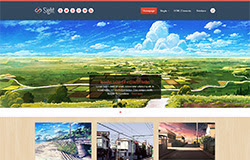
Sight Blogger Template Html5 CSS3

Free download blogspot template Html5 CSS3
Designer: Freshface
London Creative

Template features : Wordpress Look, 2 Columns, Right Sidebar, Photography, Elegant, Featured Content Slider, Fixed Width, Black Background, Top Navigation Menu, Page Navigation.
Free download blogspot template Html5 CSS3
Designer : Freshface
Basic Instructions : How to install a Blogger Template
Configure Post Date:
Log in to Blogger Dashboard --> Settings --> Format and change this: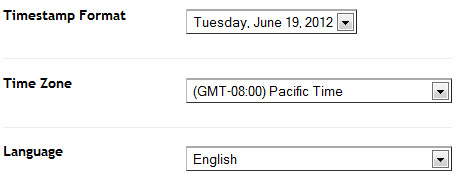
If you don't do this, it will display "UNDEFINED".
Configure Featured Content Slider:
Login to blogger dashboard --> layout --> Edit HTML. Now scroll down to where you see the codes below:<ul id='fresh_cube_data'> <li class='fresh_cube_image_0'> <img src='/image.jpg'/> <span class='transition' title='random'> <div class='post_category' id='slider_post_cat'>/ <a href='#'>Web Design</a>/</div> <div class='post_name'> <a href='#' id='slider_img_desc'>1000s of Images In My Mind</a> </div> </span> </li> .......... <div class='thumbs' id='thumbs'> <div class='slider_content' id='sl_content'> <ul id='slider_ul'> <li><img alt='img' src='/thumb.jpg'/> <div class='slider_tit' style='display:none'>/ Web Design /</div> <a class='slider_desc' href='#' style='display:none' title='0'>1000s of Images In My Mind</a> </li> ..........
- "#" with your featured post URL.
- "image.jpg" with your slider image.
- "thumb.jpg" with your thumbnail image.
Configure Dropdown Menu:
Login to blogger dashboard --> layout --> Edit HTML. Now scroll down to where you see the codes below:<div class='menu-nav-container'> <ul class='menu' id='menu-nav'> <li><a expr:href='data:blog.homepageUrl'>Home</a></li> <li><a href='#'>About</a> <ul class='sub-menu'> <li><a href='#'>Dropdown test</a></li> ..........
Configure Page Navigation Widget:
search for:var posts=2, // Number of posts in each page num=2, // Number of buttons will display
London Creative Blogger Template
Subscribe to:
Posts
(
Atom
)


