
Showing posts with label personal. Show all posts
Showing posts with label personal. Show all posts

Platform: Blogger / Blogspot
Release date : August 2013
Free download blogspot template Html5 CSS3
Designer : BluthCompany
Template features : Blogging, Personal, Responsive, Dropdown Menu, Social Widget, Page Navigation.
License : Creative Commons Attribution 3.0
Basic Instructions : How to install a Blogger Template
Configure Dropdown Menu:
Login to blogger dashboard --> layout --> Edit HTML. Now scroll down to where you see the codes below:<ul class='nav' id='menu-primary'> <li><a href='#'>Home</a></li> <li><a href='#'>Theme Options</a></li> <li class='dropdown'><a href='#'>Pages</a> <ul class='dropdown-menu'> <li><a href='#'>Full Width</a></li> <li><a href='#'>Right Sidebar</a></li> ..........
Configure Page Navigation Widget
search for:var posts=4, // Number of posts in each page num=2, // Number of buttons will display
Keilir Blogger Template Html5 CSS3
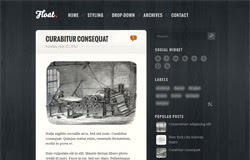
FLoat Blogger Template:- New Awesome Cute Style Blogger Template designed by Sora Templates,Actually this template is ideal for personal blogs.It has ready Social Sharing Buttons at right side-bar and having crystal black color background.Woody Bubble like comment button is present at every post which shows the Number of comments on the Blog Contents.A very Stunning Drop Down menu is added to the header which give 100 points to this template beauty.Ready Author info widget is present in this template where you can edit information.Moreover New Tags and search widgets along with many other customized widgets are added to this template. It works with Google Chrome,Firefox,and Internet Explorer,You can get it free from Our Blog.

~Change The Text According and Save template that's it :)

Features Of Float Blogger Template
- Personal
- Customized ready widgets
- SEO Friendly
- Ads Ready
- Awesome Header
- Works with all Browsers
- Fixed Width
- Top Navigation menu
Configuring Drop Down Menu
- Go To Blogger Dashboard
- Click On Template >> EDIT HTML >> and Search for Home you will Find the Below Script
<nav class='menu-menu-container'>~Replace "#" with your menu URL Item
<ul class='menu' id='menu-menu'>
<li><a href='#'>Home</a></li>
<li><a href='#'>Styling</a></li>
<li><a href='#'>Drop-down</a>
<ul class='sub-menu'>
<li><a href='#'>News</a></li>
<li><a href='#'>Video</a></li>
Configuring Author Info Widget
Search for the below Code in the Template
<img class='avatar avatar-56 photo' height='56' src='/author.png' width='56'/><h3>About the author</h3>
<p>Donec non enim in turpis...</p>
</div>
~Change The Text According and Save template that's it :)
Float Blogger Template
Last Reviewed by Iftikhar uddinon June 25 2013
Rating:
Last Reviewed by Iftikhar uddinon June 25 2013
Rating:
Float Blogger Template

Platform: Blogger / Blogspot
Release date : June 2013
Free download blogspot template Html5 CSS3
Designer: vickystudio
Template features : Personal, Interior, Fixed Width, Dropdown Menu, Social Widget, Gray Background, Page Navigation Widget.
License : Creative Commons Attribution 3.0
Basic Instructions : How to install a Blogger Template
Configure Dropdown Menu:
Login to blogger dashboard --> layout --> Edit HTML. Now scroll down to where you see the codes below:<ul class='nav-menu' id='menu-main-menu'> <li><a href='#'>Home</a></li> <li><a href='#'>Custom Color</a></li> <ul class='sub-menu'> <li><a href='#'>Interior</a></li> <li><a href='#'>Portfolio</a></li> ..........
Configure Social Widget:
search for:<div class='share_item'> <a class='twitterIcon' href='#'>twitter</a> <a class='facebookIcon' href='#'>facebook</a> <a class='googleIcon' href='#'>google</a> .......... </div>
How to change Author Section
search for:<div class='author_post_name'> <h4>About "<a href='#' rel='author'>Administrator</a>"</h4> </div> <div class='author_post_pic'> <img class='avatar avatar-56 photo' height='56' src='/avatar.png' width='56'/></div> <div class='author_post_desc'> Lorem ipsum dolor sit ame..........
Configure Page Navigation Widget
search for:var posts=4, // Number of posts in each page num=2, // Number of buttons will display
ModernBlog Blogger Template Html5 CSS3
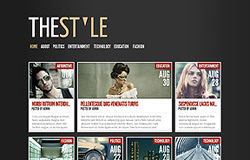
Platform: Blogger / Blogspot
Template features : Wordpress Look, Personal, Modern, Right Sidebar, Dark Background, Top Navigation Menu, Page Navigation Widget, Tabbed Widget.
Free download blogspot template Html5 CSS3
Designer : www.elegantthemes.com
License : Creative Commons Attribution 3.0
Basic Instructions : How to install a Blogger Template
Note: you must publish at least 10 posts, or the template will not work properly.
Configure Post Date:
Log in to Blogger Dashboard --> Settings --> Format. Make sure the Timestamp Format and Language are all changed to the following: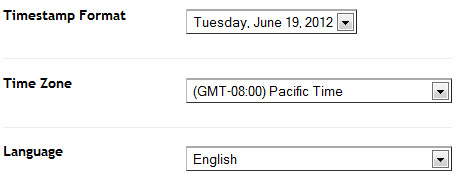
If you don't do this, it will display "UNDEFINED".
Configure Page Navigation Widget:
search for:var posts=7, // Number of posts in each page num=2, // Number of buttons will display
TheStyle Blogger Template
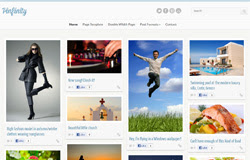
Template features : Pinterest Look, Clean Design, Social Widget, Dropdown Menu.
Free download blogspot template Html5 CSS3
Designer : cssigniter
Basic Instructions : How to install a Blogger Template
Configure Dropdown Menu:
Login to blogger dashboard --> layout --> Edit HTML. Now scroll down to where you see the codes below:<ul class='group' id='navigation'> <li class='current_page_item'><a href='#'>Home</a></li> <li><a href='#'>Page Template</a></li> <ul> <li><a href='#'>Standard Format</a></li> <li><a href='#'>Image Format</a></li> ..........
Configure Social Widget:
search for:<aside class='widget group widget_ci_social_widget'> <a class='icn twitter' href='https://twitter.com'>Twitter</a> <a class='icn facebook' href='http://www.facebook.com'>Facebook</a> <a class='icn pinterest' href='http://pinterest.com'>Pinterest</a> <a class='icn youtube' href='http://www.youtube.com'>Youtube</a> </aside>
Pinfinity Blogger Template
Template features : Wordpress Look, 2 Columns, Right Sidebar, Elegant, Personal, Fixed Width, Wood Background, Dropdown Menu.
Free download blogspot template Html5 CSS3
Designer : 4template
Basic Instructions : How to install a Blogger Template
Configure Post Date:
Log in to Blogger Dashboard --> Settings --> Format, change this:If you don't do this, it will display "UNDEFINED".
Configure Dropdown Menu:
Login to blogger dashboard --> layout --> Edit HTML. Now scroll down to where you see the codes below:<ul id='dropmenu'> <li class='first current_page_item'><a href='#'>Home</a></li> <li><a href='#'>Photo Galleries</a> <ul class='children'> <li><a href='#'>Nature</a> <ul class='children'> <li><a href='#'>Clouds</a></li> <li><a href='#'>Water</a></li> ..........
Leatherbound Blogger Template
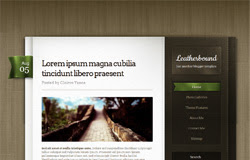
Template features : 2 Columns, Right Sidebar, Personal, Fixed Width, Black Background, Top Navigation Menu, Social Widget.
Free download blogspot template Html5 CSS3
Designer : bobosh
Basic Instructions : How to install a Blogger Template
Configure Dropdown Menu:
Login to blogger dashboard --> layout --> Edit HTML. Now scroll down to where you see the codes below:<nav class='menu-menu-container'> <ul class='menu' id='menu-menu'> <li><a href='#'>Home</a></li> <li><a href='#'>Styling</a></li> <li><a href='#'>Drop-down</a> <ul class='sub-menu'> <li><a href='#'>News</a></li> <li><a href='#'>Video</a></li> ..........
Configure Social Widget:
Look for:<h2 class='widget-title'>Social Widget</h2> <ul> <li><a href='#' id='dribbble'>Dribbble</a></li> <li><a href='#' id='facebook'>Facebook</a></li> <li><a href='#' id='flickr'>Flickr</a></li> <li><a href='#' id='twitter'>Twitter</a></li> ..........
How to change Author Information:
Find this:<img class='avatar avatar-56 photo' height='56' src='/author.png' width='56'/> <h3>About the author</h3> <p>Donec non enim in turpis...</p> </div>
Float Blogger Template

Template features : 2 Columns, Right Sidebar, Elegant, Fixed Width, Gray Background, Top Navigation Menu, Social Bar.
Free download blogspot template Html5 CSS3
Designer : ghostpool.com
Basic Instructions : How to install a Blogger Template
Configure Dropdown Menu:
Login to blogger dashboard --> layout --> Edit HTML. Now scroll down to where you see the codes below:<ul class='menu' id='menu-header-tabs'> <li><a expr:href='data:blog.homepageUrl'>Home</a></li> <li><a href='#'>Most Commented</a></li> ..........
How to change Author Information:
search for:<div class='post-panel left'> <h3>About The Author: admin</h3> <div class='clear'/> <img class='avatar avatar-55 photo' height='55' src='/logo.png' width='55'/> <div class='author-meta'> <div class='author-desc'>Lorem ipsum dolor sit amet...</div> <div class='author-links'><a href='#'>Website</a> / <a href='#'>Other Posts</a> </div>
Buzz Blogger Template

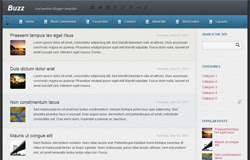
Template features : 2 Columns, Right Sidebar, Elegant, Fixed Width, Personal, Black Background, Top Navigation Menu, Page Navigation Widget, Social Bookmarking Bar.
Release date : June 2012
Free download blogspot template Html5 CSS3
Designer : www.elegantthemes.com
Basic Instructions : How to install a Blogger Template
Configure Post Date:
Log in to Blogger Dashboard --> Settings --> Format and change this:If you don't do this, it will display "UNDEFINED".
Configure Dropdown Menu:
Login to blogger dashboard --> layout --> Edit HTML. Now scroll down to where you see the codes below:<ul class='nav superfish clearfix'> <li><a href='#'>Home</a></li> <li><a href='#'>About</a> <ul class='children'> <li><a href='#'>Contact Us</a></li> ..........
Configure Page Navigation Widget:
search for:var posts=3, // Number of posts in each page num=3, // Number of buttons will display
LightBright Blogger Template

Template features : Wordpress Look, 2 Columns, Right Sidebar, Personal, Elegant, Featured Content Slider, Fixed Width, Header Banner, Top Navigation Menu, Page Navigation.
Release date : June 2012
Free download blogspot template Html5 CSS3
Designer : www.elegantthemes.com
Basic Instructions : How to install a Blogger Template
Configure Post Date:
Log in to Blogger Dashboard --> Settings --> Format and change this:If you don't do this, it will display "UNDEFINED".
Configure Dropdown Menu:
Login to blogger dashboard --> layout --> Edit HTML. Now scroll down to where you see the codes below:<div id='pages'> <ul class='nav' id='nav2'> <li class='current_page_item'><a href='#'>Home</a></li> <li><a href='#'>About Us</a> <ul class='children'> <li><a href='#'>Meet The Team</a></li> <li><a href='#'>Our Mission Statement</a></li> ..........
How To Change Slogan and Header Banner:
search for:<div id='slogan'> Donec consectetuer tincidunt diam...</div> <a href='#'><img alt='banner ad' class='foursix' src='/468x60.gif'/></a>
- "#" with your banner URL.
- "468x60.gif" with your banner image.
Configure Page Navigation Widget:
search for:var posts=4, // Number of posts in each page num=2, // Number of buttons will display
CherryTruffle Blogger Template

Template features : 3 Columns, Right Sidebar, Personal, Elegant, Fixed Width, Left Vertical Menu, Page Navigation.
Release date : June 2012
Free download blogspot template Html5 CSS3
Designer : www.elegantthemes.com
Basic Instructions : How to install a Blogger Template
Configure Dropdown Menu:
Login to blogger dashboard --> layout --> Edit HTML. Now scroll down to where you see the codes below:<ul class='nav' id='menu-pages'> <li><a href='#'>Home</a></li> <li><a href='#'>About</a></li> <li><a href='#'>Page Templates</a> <ul class='sub-menu'> <li><a href='#'>Sitemap</a></li> <li><a href='#'>Full Width</a></li> ..........
Configure Page Navigation Widget:
search for:var posts=4, // Number of posts in each page num=2, // Number of buttons will display
Daily Journal Blogger Template Html5 CSS3
Subscribe to:
Posts
(
Atom
)


