
Showing posts with label Business. Show all posts
Showing posts with label Business. Show all posts

Platform: Blogger / Blogspot
Release date : May 2013
Free download blogspot template Html5 CSS3
Designer : themeblvd
Template features : Portfolio, Fashion, Featured Content Slider, Fixed Width, Dropdown Menu, Social Widget, Blue Background, Page Navigation Widget.
License : Creative Commons Attribution 3.0
Basic Instructions : How to install a Blogger Template
Configure Featured Content Slider:
Login to blogger dashboard --> layout --> Edit HTML. Now scroll down to where you see the codes below:<ul class='carrousel-slider'> <li class='slide'> <div class='slide-body'> <div class='grid-protection'> <a class='image-link enlarge' href='#'><span>Image Link</span></a> <img src='../slide.jpg'/> </div> </div> </li> ..........
- "#" with your featured post URL.
- "slide.jpg" with your slider image.
Configure Dropdown Menu:
Login to blogger dashboard --> layout --> Edit HTML. Now scroll down to where you see the codes below:<ul class='menu' id='menu-main-menu'> <li><a href='#'>Home</a></li> <li><a href='#'>Blog</a></li> <ul class='sub-menu'> <li><a href='#'>Full Width Page</a></li> <li><a href='#'>Sidebar Right</a></li> ..........
Configure Page Navigation Widget:
search for:var posts=8, // Number of posts in each page num=2, // Number of buttons will display
Alyeska Blogger Template Html5 CSS3

Platform: Blogger / Blogspot
Free download blogspot template Html5 CSS3
Designer : temashdesignlab
Template features : Wordpress Look, 2 Columns, 3 Columns Footer, Left Sidebar, Portfolio, Business, Featured Content Slider, Fixed Width, Light Gray Background, Top Navigation Menu, Page Navigation Widget.
License : Creative Commons Attribution 3.0
Instructions : eSpecial Blogger Template
eSpecial

Template features : Wordpress Look, 2 Columns, 3 Columns Footer, Left Sidebar, Portfolio, Business, Featured Content Slider, Fixed Width, Dark Background, Top Navigation Menu, Page Navigation Widget.
Free download blogspot template Html5 CSS3
Designer : temashdesignlab
License : Creative Commons Attribution 3.0
Basic Instructions : How to install a Blogger Template
Configure Post Date:
Log in to Blogger Dashboard --> Settings --> Format. Make sure the Timestamp Format and Language are all changed to the following: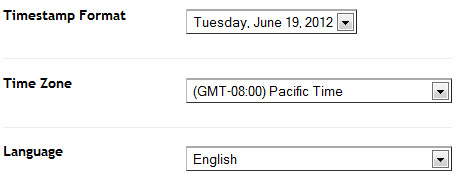
If you don't do this, it will display "UNDEFINED".
Configure Featured Content Slider:
Login to blogger dashboard --> layout --> Edit HTML. Now scroll down to where you see the codes below:<ul class='lof1-main-wapper'> <li><a href='#'><img src='/image.jpg'/></a> <div class='lof1-main-item-desc'> <div class='lof1-main-item-title'> <h2><a href='#'>Professional Business & Portfolio Theme</a></h2></div> <p>Lorem ipsum dolor sit amet, consectetur adipiscing elit.</p> </div> </li> .......... <ul class='lof1-navigator'> <li><img src='/thumb.jpg'/> </li> ..........
- "#" with your featured post URL.
- "image.jpg" with your slider image.
- "thumb.jpg" with your thumbnail image.
Configure Dropdown Menu:
Login to blogger dashboard --> layout --> Edit HTML. Now scroll down to where you see the codes below:<ul class='s-menu' id='menu-main-navigation'> <li><a href='#'>Home</a> <ul class='sub-menu'> <li><a href='#'>Home page layout 2</a></li> </ul> </li> <li><a href='#'>Sliders</a> ..........
Configure Page Navigation Widget:
search for:var posts=4, // Number of posts in each page num=2, // Number of buttons will display
eSpecial Blogger Template


Template features : Wordpress Look, 2 Columns, Right Sidebar, 3 Columns Footer, Business, Elegant, Featured Content Slider, Fixed Width, Light Background, Top Navigation Menu, Email Subscription Form.
Free download blogspot template Html5 CSS3
Designer: Parallelus
Basic Instructions : How to install a Blogger Template
Configure Post Date:
Log in to Blogger Dashboard --> Settings --> Format and change this:If you don't do this, it will display "UNDEFINED".
Configure Featured Content Slider:
Login to blogger dashboard --> layout --> Edit HTML. Now scroll down to where you see the codes below:<div id='Slide'> <img alt='Slide 1' height='341' src='/image.jpg' width='948'/> ..........
Configure Dropdown Menu:
Login to blogger dashboard --> layout --> Edit HTML. Now scroll down to where you see the codes below:<ul class='sfmenu'> <li class='current'><a expr:href='data:blog.homepageUrl'>Home</a></li> <li><a href='#'>Features</a> <ul> <li><a href='#'>Home page</a> ..........
Unite Blogger Template
Subscribe to:
Posts
(
Atom
)

